The SABRENT SuperSpeed 2 Slot USB 3.0 Flash Memory Card Reader review centers on a simple job: connecting supported memory cards to a computer over USB.
Its USB 3.0 interface, broad card-format support and plug-and-play design make it a practical option for routine transfers, provided your device has a compatible USB port.
SABRENT Card Reader Review Summary
The quick verdict
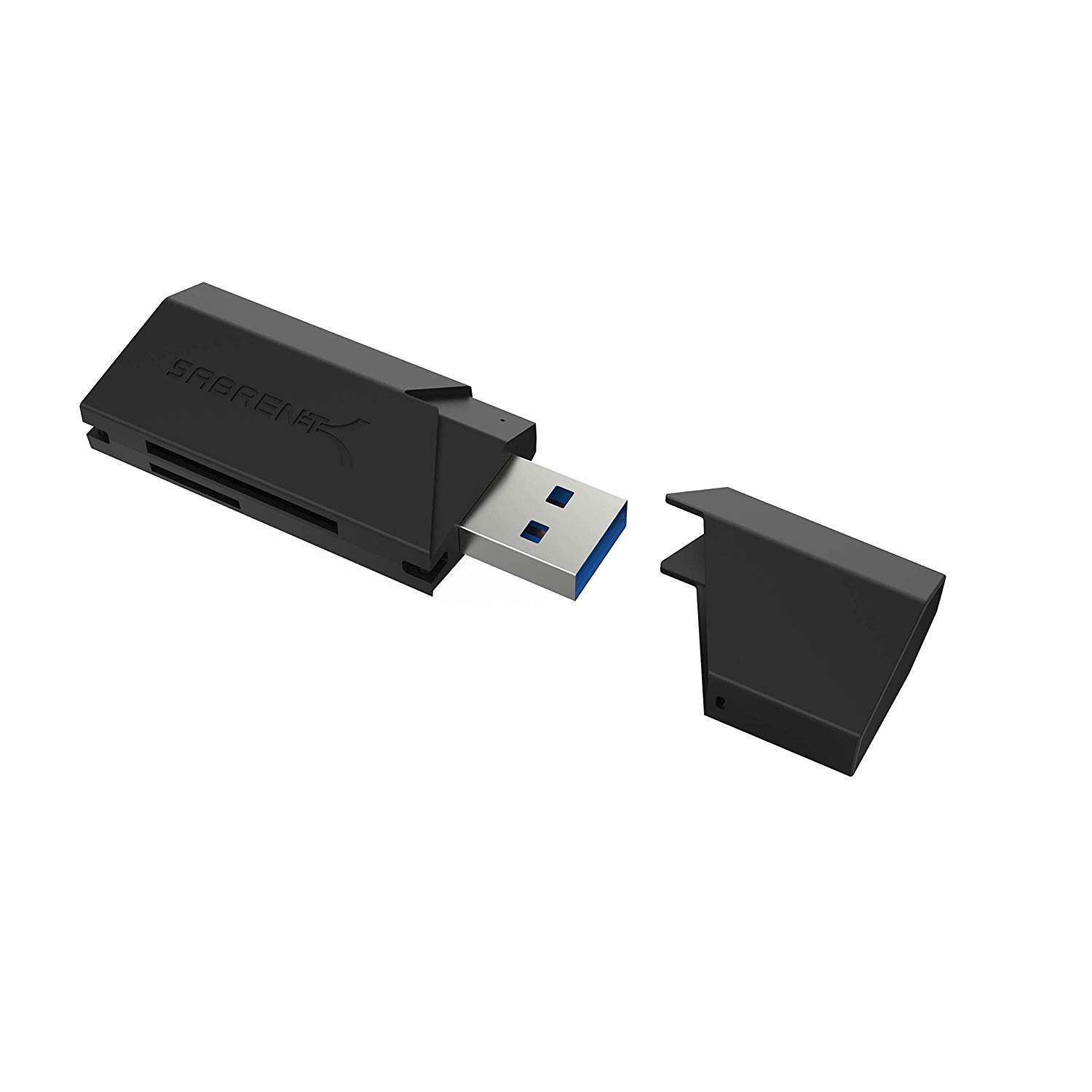
10,000+ ratings
Read Amazon ReviewsSABRENT SuperSpeed 2-Slot USB 3.0 Card Reader
A straightforward choice for transferring files from supported SD and microSD cards to computers with USB-A ports.
- USB 3.0 interface for connecting the reader to a host computer.
- Backward compatible with USB 2.0 hosts.
- Supports SD, SDHC, SDXC, MMC, microSD and T-Flash cards.
- Receives power from the USB port and does not need an additional power supply.

Pros
- Supports several SD-family formats plus MMC and T-Flash.
- USB 3.0 connectivity with backward compatibility for USB 2.0 hosts.
Consider before buying
- The listed formats do not establish support for every memory card type, so confirm your card’s exact format before purchasing.
- Android compatibility applies only to certain systems; check compatibility with the specific device you plan to use.
Read the full review summary
This reader covers several familiar card formats, including SD, SDHC, SDXC, MMC, microSD and T-Flash. It draws power through the USB port and needs no separate power supply, which keeps a basic transfer setup simple.
USB 3.0 provides the interface, while backward compatibility lets it connect to USB 2.0 hosts when that is what your computer offers.
It may suit a home recording or music-making setup when you need to move files from a recorder, camera or other compatible device that uses one of the supported cards.
The product description names Windows, Mac, Linux and certain Android systems, but Android support is limited to compatible systems.
Check your device’s port and card type before buying; the supplied details do not specify transfer rates beyond the USB 3.0 interface.
The buying factors
SABRENT Card Reader Scorecard
Editorial scores reflect listed features and buyer fit; they are not laboratory measurements or customer ratings.
Card-format coverage
It supports SD, SDHC, SDXC, MMC, microSD and T-Flash, covering a useful range of common card types.
Computer compatibility
Windows, Mac and Linux are named, along with certain Android systems; the Android qualification calls for a compatibility check.
Connection flexibility
USB 3.0 and USB 2.0 host compatibility help with different generations of USB-A setups, though the supplied details do not describe other connector types.
Setup simplicity
Plug-and-play operation with no installation required is convenient for occasional transfers.
Power convenience
USB port power means no separate power supply is needed.
Speed detail
USB 3.0 is specified, but no actual transfer-rate figure is provided, so speed expectations should stay tied to the full device and card setup.
Key Features and Specifications of SABRENT Card Reader
- USB 3.0 interface for connecting the reader to a host computer.
- Backward compatible with USB 2.0 hosts.
- Supports SD, SDHC, SDXC, MMC, microSD and T-Flash cards.
- Receives power from the USB port and does not need an additional power supply.
- Plug-and-play use; no installation is required.
- Compatibility includes Windows, Mac, Linux and certain Android systems.
Pros and Cons of SABRENT Card Reader
Pros
- Supports several SD-family formats plus MMC and T-Flash.
- USB 3.0 connectivity with backward compatibility for USB 2.0 hosts.
- USB-powered design avoids carrying a separate power supply.
- Plug-and-play setup is convenient for straightforward file transfers.
Consider before buying
- The listed formats do not establish support for every memory card type, so confirm your card’s exact format before purchasing.
- Android compatibility applies only to certain systems; check compatibility with the specific device you plan to use.
- No transfer-rate figure is provided, so the USB 3.0 label alone does not set a guaranteed real-world speed.
Who Should Buy SABRENT Card Reader?
Good fit
Consider this reader if you routinely move audio, project or other files from SD or microSD media to a computer with a compatible USB port.
Its support for several card formats can make it useful in a shared home workstation where media comes from more than one device.
The no-installation setup and USB-powered operation suit occasional use as well as a compact transfer station.
Before buying, match your card to the supported formats and confirm that your computer or compatible Android device can use the reader’s connection.
Who should skip it
Look elsewhere if your workflow depends on a card format outside the listed SD, SDHC, SDXC, MMC, microSD and T-Flash families.
Likewise, if a specific high transfer rate is essential, first check the expected performance for your cards and host rather than assuming a result from the USB 3.0 interface alone.
If you plan to connect it to an Android device, verify that the particular system supports this reader. The product details qualify Android compatibility rather than describing universal support.
SABRENT Card Reader: What Matters for File Transfers
Card support for mixed media
The range of listed formats is useful when your files arrive on different kinds of media. SD, SDHC and SDXC support covers several SD card generations, while microSD, MMC and T-Flash add other named options.
Check the markings or documentation for your card so the format matches before you rely on the reader for a project.
USB interface and speed expectations
USB 3.0 is the specified interface, and compatibility with USB 2.0 hosts gives the reader flexibility with older computers.
Actual transfer pace depends on the broader setup, including host port and card; the product details do not give a measured or maximum speed.
For large audio sessions or frequent video transfers, base your decision on a speed requirement you can verify for your particular devices.
Power and setup
Drawing power from the USB port avoids a separate adapter, and plug-and-play operation removes an installation step. That makes the reader straightforward for a desk or laptop bag.
A USB-powered design still depends on a suitable host connection, so check the port available where you expect to use it.
Operating system fit
Windows, Mac and Linux are included in the compatibility list, with Android support limited to certain systems. This is a reasonable spread for a reader used across computers, but mobile compatibility deserves a closer check.
Confirm that your Android device supports the reader and can access the card format you intend to use.
Alternatives to SABRENT Card Reader
Computer Memory Card Readers alternative
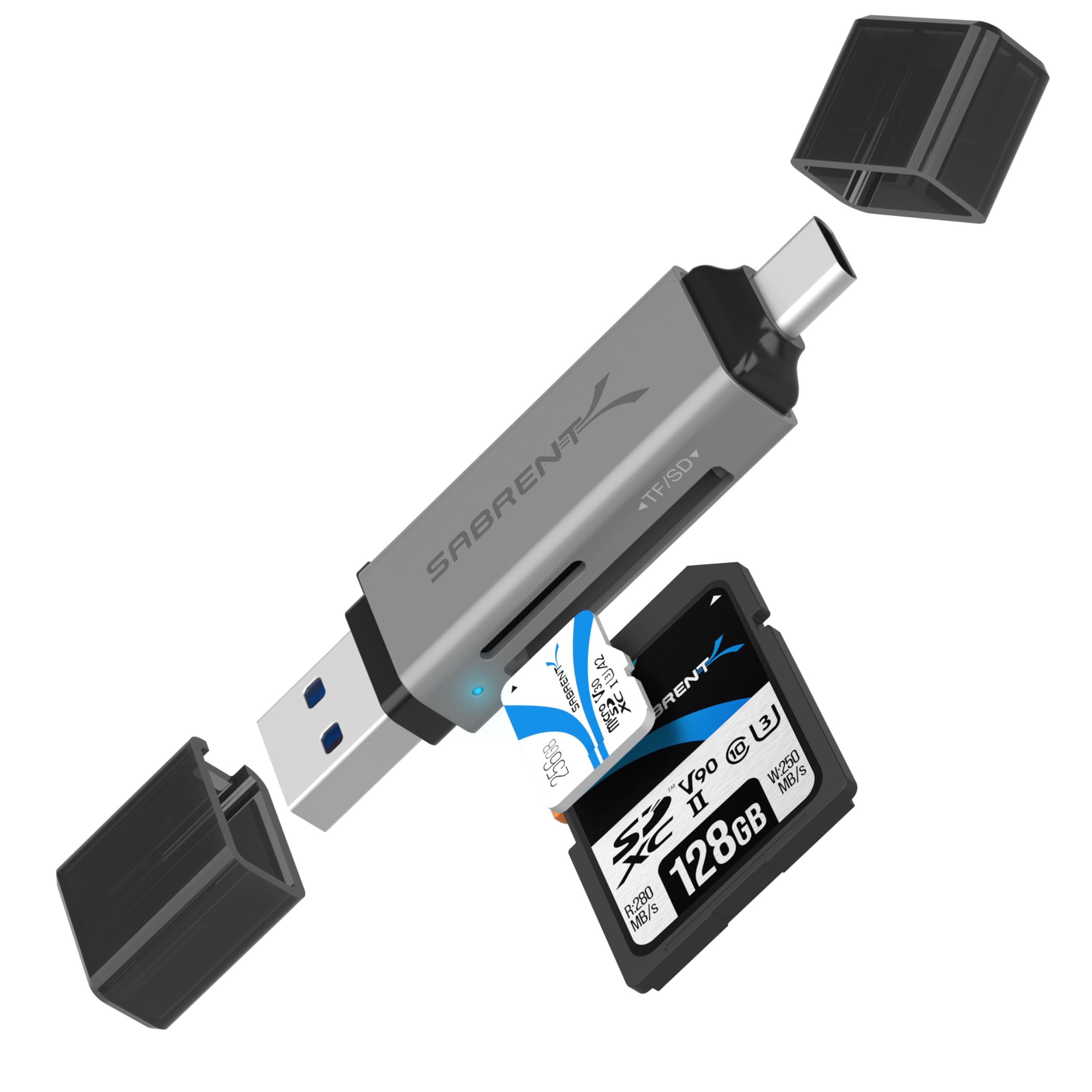
2,000+ ratings
Read Amazon ReviewsSABRENT USB-C & USB-A SD/MicroSD Card Reader (CR-BCA2)
Choose the CR-BCA2 if your devices use a mix of USB-C and USB-A ports or you want a stated interface maximum and activity light.
The SuperSpeed 2-Slot model may fit better when support for MMC or T-Flash matters, since those formats are not listed for the alternative.
- This model offers both USB-C and USB-A connectors and lists SD and microSD card families.
- It specifies USB 3.0 transfers up to 5Gbps, backward compatibility with USB 2.0, plug-and-play use and an LED activity indicator.
- The SuperSpeed 2-Slot reader supports SD, SDHC, SDXC, MMC, microSD and T-Flash, and is backward compatible with USB 2.0 hosts.
Is SABRENT Card Reader Worth It?
The SABRENT SuperSpeed 2-Slot USB 3.0 Card Reader is worth considering for straightforward transfers from its supported memory card formats. USB power, plug-and-play setup and USB 2.0 host compatibility make the design convenient for a basic computer workflow.
Before choosing it, confirm the card format and host connection you need, especially for Android use.
Buyers who require a particular transfer speed should verify that their card and computer can meet the workflow’s needs, since no transfer-rate figure is provided here.
Your review at a glance
10,000+ ratings
Read Amazon ReviewsSABRENT SuperSpeed 2-Slot USB 3.0 Card Reader
A straightforward choice for transferring files from supported SD and microSD cards to computers with USB-A ports.
- USB 3.0 interface for connecting the reader to a host computer.
- Backward compatible with USB 2.0 hosts.
- Supports SD, SDHC, SDXC, MMC, microSD and T-Flash cards.
- Receives power from the USB port and does not need an additional power supply.